Why Pre-Wire Matters More Than Ever
The "we'll just use Wi-Fi" argument loses every time the homeowner adds a 4K streaming device, a video doorbell, three security cameras, two ceiling APs, and a hardwired rack of automation gear. Wireless handles convenience devices. Hardwire handles backbone, latency-sensitive equipment, and anything mounted permanently to a ceiling or exterior wall.
Builders who treat low-voltage as an afterthought leave money on the table and create callbacks. Builders who pre-wire properly during rough-in deliver a finished product that supports whatever the homeowner buys for the next decade — without opening drywall.
This guide covers what to pull, where to terminate it, how to size the structured media center, and how to sequence the work so it lands on inspection day with zero rework.
Cable Types and What They Serve
Most smart home pre-wires use four to six cable types. Standardize on a small palette so the installer can stock truck inventory and the homeowner can document what's behind every plate.
| Cable Type | Primary Use | Termination | Notes |
|---|---|---|---|
| Cat6 UTP | Data drops, IP cameras, smart panels, doorbells | RJ45 jack at wall, patch panel at SMC | Baseline cable; PoE+ rated to 100m |
| Cat6A F/UTP | Ceiling APs, future 10G drops, long runs | Shielded RJ45 jack; bonded shield at panel | Use for any AP location; 10GBASE-T to 100m |
| RG6 Quad-Shield | TV locations, satellite, OTA antenna | F-connector compression; barrel at wall plate | Even cord-cutters benefit from one drop per TV |
| 16/4 OFC Speaker | In-ceiling speaker pairs (stereo) | Banana plugs at amp; bare wire at speaker | UL CL2/CL3 rated for in-wall use |
| 18/2 Stranded | Keypads, contact sensors, low-voltage controls | Screw terminal at device and panel | UL CL2 rated; pulls in same bundle as data |
| OS2 Single-mode Fiber | SMC-to-IDF backbone, future-proofing | LC at both ends, fusion splice or pre-term | Pull in conduit; one strand pair minimum |
Why Cat6A at Ceiling APs
A modern Wi-Fi 6E or Wi-Fi 7 access point can serve clients faster than 1Gbps aggregate. Pulling Cat6A to ceiling AP locations (and bonding the shield at the panel) means the AP can land on a 2.5G or 10G PoE switch port without re-pulling cable. Cat6 works today. Cat6A works for the next AP refresh too.
Drop Counts by Room
The cheapest drop is the one pulled before drywall. Adding a single Cat6 after the home is finished costs 5x to 10x what it costs at rough-in. Default to more than you think you need — labor cost difference between two and three drops at one location is roughly 8 minutes of pull time.
Standard Drop Schedule
- TV locations (every room with a planned TV): 2× Cat6 + 1× RG6, all to a single low-voltage box behind the TV. Add 1× HDMI conduit if a wall-mount source is planned.
- Desk walls (offices, bedrooms): 2× Cat6 at desk height, ideally on two adjacent walls so furniture orientation isn't fixed.
- Ceiling AP locations: 1× Cat6A per AP, dropped to a low-voltage ceiling box. Plan one AP per 1,500 sq ft as a baseline; one per floor minimum.
- Cameras (interior and exterior): 1× Cat6 per camera, terminated at the camera location with weatherproof IP65+ jacks for exterior runs.
- Doorbell: 1× Cat6 from front door to SMC. Most modern video doorbells are PoE.
- Smart keypads / touch panels: 1× Cat6 + 1× 18/2 per panel location.
- Garage / shop: 2× Cat6 to a centrally mounted box; one for AP, one for spare or workbench.
- Bedrooms: Minimum 2× Cat6 to one wall. Treat each as a potential office.
- Home theater (dedicated): 4× Cat6 + 2× RG6 + speaker wire per ceiling pair + 16/4 to subwoofer location + HDMI conduit from rack to projector.
The Structured Media Center (SMC)
The SMC is the home's network and AV brain. Locate it well, size it right, and the rest of the install is straightforward. Locate it poorly and every device for the next 15 years pays the price in latency, heat, and accessibility.
Location Requirements
- Climate: Conditioned space (60-80°F year round). Avoid attics and exterior garage walls.
- Centrality: Within 90m cable run of every drop. For homes over 6,000 sq ft, consider a remote IDF connected by fiber.
- Accessibility: Adult standing height. Not behind washer/dryer or above water heater.
- Power: Dedicated 20A circuit; minimum two outlets inside enclosure; surge protection.
- Demarc proximity: ISP entry point within 50 feet, connected by conduit if possible.
- Ventilation: Active or passive ventilation; loaded enclosures generate 200-400W of heat.
Enclosure Sizing
- Up to 24 drops: 28-inch structured wiring enclosure with internal patch panel.
- 24-48 drops: 42-inch enclosure or wall-mount 12U mini-rack.
- 48+ drops or AV gear: Floor-standing 24U+ rack with proper ventilation.
For homes with serious AV (multi-zone audio, distributed video, security DVR, automation server), skip the structured wiring enclosure and go straight to a 12-24U rack with rails, blanking panels, and rear cable management.
Rough-In Sequencing
Low-voltage rough-in lands between electrical rough-in and insulation. The window is typically 3 to 5 days for a 4,000 sq ft home. Coordinate with the GC at the framing walk-through to lock the schedule.
Day 1: Box Setting and Plate Locations
Walk the home with the homeowner and the GC. Confirm every device location. Set mud rings (single, double, or low-voltage open-back) at every drop. Mount AP boxes to ceiling joists. Set camera boxes on exterior walls before house wrap closes.
Day 2-3: Cable Pulling
Pull all cable types from the SMC to each device location. Maintain 12-inch separation from parallel electrical runs; cross at 90 degrees. Use J-hooks or bridle rings for support every 4-5 feet. Leave 6-foot service loops at the SMC and 12-inch loops at each drop location. Label every cable at both ends with permanent labels — masking tape and Sharpie does not survive sheetrock dust.
Day 4: SMC Termination Prep
Mount the enclosure or rack. Land cables on patch panel (jacks pointing into enclosure). Test continuity on every drop with a basic verification tester before insulation closes the walls — finding a damaged jacket while the wall is open is a 5-minute fix; finding it after drywall is a $400 fish job.
Trim-Out (After Paint)
Set jacks in wall plates, mount Wi-Fi APs, install camera bodies, configure switches, certify every drop, deliver as-built documentation.
Termination Best Practices
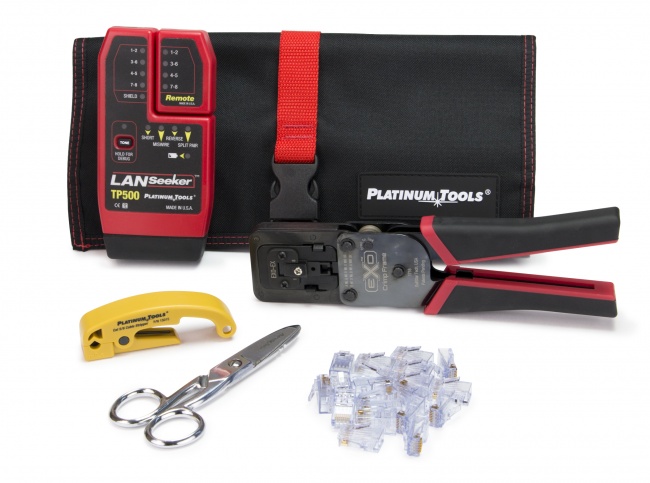
The connector is where data quality lives or dies. The cable carries the signal; the termination ruins it. Use a quality EZ-RJ45 or feed-through connector system with a matching crimp tool, and you'll pass certification on the first try.
Wall Plate Strategy
Use Keystone-style modular plates with appropriate insert combinations: 4-port plates at TV locations (2× data jack, 1× F-connector, 1× blank for HDMI dongle), 2-port at desk walls, 1-port at AP ceiling locations. Standardize on white inserts unless the homeowner has specified otherwise.
Conduit Strategy
Conduit costs $0.50 to $2 per foot installed during rough-in. After construction, the only way to add cable is through the same conduit (free) or through a fish job (expensive). Two conduit pulls deliver an outsize return:
- 1-inch ENT (smurf tube) from SMC to attic — enables future runs to anywhere on the upper floor
- 1-inch ENT from SMC to crawlspace or basement — enables future runs to anywhere on the lower level
- 3/4-inch ENT to any ceiling-mounted projector or display location
- 1-inch ENT to any remote IDF location (carries fiber backbone + spares)
- 1-inch PVC sleeve from SMC to ISP demarc point
Pull a nylon mule tape or pull string in every conduit before sheetrock. Empty conduit with no pull string is just a tube.
Documentation Deliverables
The pre-wire is only complete when the homeowner can troubleshoot and modify the system without calling you. Hand off:
- As-built floor plan showing every drop with port number reference
- Patch panel labeling sheet (port number → room → device type)
- Certification report from cable certifier (one page per drop)
- Photo set of SMC build, with cable bundles labeled
- Network configuration sheet: SSID, VLAN structure, switch port assignments
- Spare parts kit: 10 spare jacks, 5 patch cords, 1 spare AP, blanking inserts
Recommended Products
The following CrimpShop products cover the high-volume consumables for a smart home pre-wire:
Related Articles
- Residential Structured Wiring Builder Guide — Companion piece for new construction at scale.
- Electrician's Guide to Structured Cabling — Background for electricians taking on low-voltage work.
- Cat6 vs Cat6A: What's the Difference? — Deep dive on cable category selection.
Frequently Asked Questions
What cable should I use for smart home pre-wire?
Cat6 is the baseline for most smart home pre-wires. Pull Cat6A to ceiling-mounted Wi-Fi access points and to any location that may serve a future 10GBASE-T device. Add RG6 quad-shield to TV locations, 16/4 to ceiling speaker pairs, 18/2 to keypad and sensor locations, and a structured fiber pull or conduit between the SMC and main living areas as a hedge against future upgrades.
Where should I locate the structured media center?
Place the SMC in a centrally located, climate-controlled, accessible space — typically a finished basement, mechanical room, or dedicated closet. Avoid attics (heat) and exterior garage walls (temperature swings). Provide a dedicated 20A circuit, 110V outlets inside the enclosure, and 6-foot service loops on every cable. The ISP demarc should land within 50 feet to keep the WAN cable run short.
How many drops should I pull per room?
For a baseline smart home: two Cat6 + one RG6 at every TV location, two Cat6 at each desk wall, one Cat6 at each ceiling AP location, one Cat6 at each ceiling camera, and one Cat6 at each smart panel/keypad. Bedrooms get a minimum of two Cat6 to one wall. Pull extras at low marginal cost — labor and rough-in access are the expensive parts. Adding a third drop after drywall is 10x the cost of pulling it during rough-in.
Do I need conduit in a smart home pre-wire?
Conduit is not required, but a single 1-inch ENT (smurf tube) sleeve from the SMC to the attic and to the basement is one of the highest-ROI additions you can make. It enables future cable additions without opening walls. Also conduit any run between the SMC and a remote IDF location, and any run that crosses a finished slab or wraps a complex ceiling assembly.
Should low-voltage cables be installed before or after electrical?
Low-voltage rough-in typically follows electrical rough-in. The electrician sets boxes and pulls power; the low-voltage installer then sets mud rings, pulls structured cable, and maintains 12-inch separation from parallel power runs. Coordinate with the GC for a dedicated low-voltage rough-in window — typically two to three days for a 4,000 sq ft home — between electrical inspection and insulation.
Stock the Truck for Pre-Wire Season
CrimpShop carries the EZ-RJ45 connectors, crimpers, J-hooks, and cable testers that smart home integrators rely on for reliable rough-in work.
Shop Smart Home Pre-Wire Tools