The Quick Answer
This guide covers how to label cables on installs over 50 drops, where ad-hoc labeling stops working. We will cover the naming convention, the physical placement, the tools that produce labels that survive, color coding, the ANSI/TIA-606-C standard, and the as-built documentation that ties it all together.
If you are doing residential work or small offices under 25 drops, this is overkill. If you are doing schools, hospitals, retail rollouts, multi-floor offices, warehouses, or anything that will be maintained by someone other than you, this is the minimum.
Why Labeling Matters at Scale
The first 30 cables in a rack look manageable. The next 30 look annoying. The next 100 look like a wall of identical gray jackets coming out of identical patch panels. Without a labeling system, every troubleshooting call turns into a tone-and-trace exercise that costs an hour you do not have.
Labels solve four specific problems on every install over 50 drops:
- Service calls take 5 minutes instead of 50. A tech who arrives at a port labeled
BLD1-F2-R204-D03can walk straight to the right wall plate. Without a label, they have to tone the cable, which means going to the closet, then to the room, then back to the closet. - Moves, adds, and changes do not break other circuits. When you label what each cable is for, you do not accidentally yank the patient monitor cable thinking it is the printer.
- You can hand off the install. The next contractor, the in-house IT team, or the building owner can maintain the network without calling you for every question.
- You bill faster and get paid faster. A clean as-built with photos, labels, and a cable schedule satisfies the GC, the architect, and the owner. Disputes about what was installed disappear.
Step 1: Build a Naming Convention
The naming convention is the brain of the system. Every label, every patch panel, every drawing, and every line of the as-built spreadsheet uses the same identifier for the same cable. If three different formats are floating around, the system has already failed.
A working convention encodes location and sequence in a fixed-length string. Four fields handle most installs:
Single Building
- Format: F[floor]-R[room]-D[drop]
- Example: F2-R204-D03
- Reads as: Floor 2, Room 204, Drop 3
- Best for: Schools, single offices, small warehouses
Campus / Multi-Building
- Format: BLD[#]-F[#]-R[#]-D[#]
- Example: BLD1-F2-R204-D03
- Reads as: Building 1, Floor 2, Room 204, Drop 3
- Best for: Hospitals, campuses, retail chains
Rules that keep the convention working
- Use leading zeros. Drop 03, not Drop 3. Otherwise sorting in spreadsheets puts D10 before D2.
- Pick fixed widths for each field. Three digits for room numbers even if your largest is two digits. Two digits for drops even if you only have nine. Future-proof the system.
- Pick a separator and stick with it. Hyphens are the standard. Slashes are okay if they read better in your environment. Do not mix.
- Skip the spaces. Spaces break parsing in label printers, spreadsheets, and CMDB tools.
- Document the convention in the project folder. One paragraph. Save it next to the cable schedule. Anyone who joins the install reads that paragraph first.
For a deeper breakdown of how patch panels and rack identifiers fit into the same scheme, see the patch panel wiring guide which covers the panel-side of the same naming.
Step 2: Label Placement (The "Both Ends Plus Both Faces" Rule)
Every cable gets four physical labels in a complete install:
- The cable jacket near the wall-plate end. 4 to 6 inches back from the connector or keystone jack.
- The wall plate or faceplate itself. Either an engraved icon, a printed insert, or a label strip on the plate.
- The cable jacket near the patch panel end. 4 to 6 inches back from the connector or punch-down.
- The patch panel port. Either a port-strip insert that ships with the panel or a label applied directly above or below the port.
The "4 to 6 inches" gap matters. If you put the label flush against the connector, the label sits inside the bundle when you dress cables, and you have to pull the bundle apart every time you want to read it. If you put the label too far back, you cannot see it from the front of the rack.
For runs longer than 50 feet through trays or above drop ceilings, add a midpoint label every 50 feet. When a future tech is up in the ceiling looking at 40 cables in a tray, they need to identify the one they are after without tracing the entire run. Midpoint labels make that possible. Cable management products like the standard J-hooks and batwing J-hooks hold runs in place; the labels tell the tech which one is which.
Step 3: Use Tools That Produce Labels That Survive
The reason is simple: paper labels absorb moisture, ink labels rub off where cables get handled, and masking tape loses its adhesive in 12 to 18 months. Inside a hot ceiling or behind a warm patch panel, even faster.
What to use
- Self-laminating thermal-transfer labels. The label has a printed area at one end and a clear plastic tail at the other. You wrap the printed area onto the cable first, then wrap the clear tail over the print to seal it. The print is now sealed under plastic and cannot rub off, fade, or peel.
- A handheld thermal-transfer cable label printer. Either a portable model that ties into your phone over Bluetooth or a dedicated label printer. Either way, the print head transfers ink onto a polyester or vinyl substrate that will outlast the cable.
- Pre-printed sequential labels for racks and panels. If you are repeatedly labeling 1 through 48 on every patch panel, a pre-printed sheet saves an hour per panel.
- Engraved or printed wall plate inserts. The faceplate itself carries the identifier, not a sticker on the jack.
What to avoid
- Sharpie on the jacket. Comes off the first time someone wipes the cable.
- Paper tape with handwriting. 12 to 18 month lifespan in any real environment.
- Office label-maker tape (the cheap home-use kind). Adhesive fails on round cable. Falls off within months.
- Sticky notes. Self-explanatory. Yet techs do this.
- "I'll come back and label it later." Nobody comes back. Label as you terminate.
Label Format Comparison
| Label Format | Lifespan | Readability | Use For |
|---|---|---|---|
| Self-laminating thermal-transfer wrap | 10+ years | Excellent | All commercial installs, all production cables |
| Heat-shrink printed sleeve | 15+ years | Excellent | Industrial, outdoor, high-vibration, harsh environments |
| Pre-printed sequential numbers | 5-10 years | Good | Patch panels, rack ports, repeating sequences |
| Engraved wall-plate icons | Life of plate | Excellent | Visible-from-room identification, premium installs |
| Vinyl flag labels (P-touch style) | 3-5 years | Good | Temporary, residential, low-traffic areas |
| Sharpie / paper tape | 3-12 months | Marginal | Trash. Do not use on production cable. |
For 95% of commercial network installs, self-laminating thermal-transfer wrap is the right answer. The other formats handle specific edge cases.
Step 4: Color Code by Circuit Purpose
Color coding is the visual filter that turns a wall of identical cables into something a tech can read at a glance. The printed label still carries the unique identifier, but the color tells the tech what kind of circuit they are looking at before they read anything.
You have three places to introduce color: the cable jacket itself, a colored boot or strain relief on the connector, or a colored portion of the label. Pick one or two methods and use them consistently.
A standard color-coding scheme that works on most jobs
- Blue: General data drops (workstations, printers)
- White or Gray: Voice or VoIP
- Yellow: Wireless access points
- Red: Security cameras and access control
- Green: Building automation, BAS, HVAC controls
- Orange: Inter-rack uplinks and trunks
- Purple: Secure or out-of-band management
If your client has a corporate standard, use theirs. Hospitals, financial services firms, and federal sites usually have a published color scheme that pre-empts whatever you would pick.
The cleanest implementation is colored cable jackets at the source. The next-best is colored strain reliefs at the connector end. Stocking cable in two or three colors handles most jobs; for the rest, colored strain reliefs on standard gray cable will encode the same information at the connector.
If you are running fiber alongside copper, color coding gets even more useful. The standard for fiber jacket and connector colors is covered in the fiber connector types guide if you need a refresher.
Step 5: Match the ANSI/TIA-606-C Standard
ANSI/TIA-606-C is the labeling and administration standard for telecommunications infrastructure. It defines four classes of administration based on installation size, and it is what specifications and contracts will reference when they say "label per TIA-606."
Class 1 (Smallest)
- Single TR (telecom room)
- Outlets and links labeled
- Minimal documentation required
- Typical: small office under 25 drops
Class 2
- Multiple TRs in a single building
- Cable, panel, rack, and outlet labeled
- Cable schedule + drawings required
- Typical: multi-floor offices, schools
Class 3
- Multiple buildings on a campus
- Backbone cabling, pathways, grounding labeled
- Full as-built documentation
- Typical: hospital campus, college
Class 4 (Largest)
- Multi-site enterprise
- Inter-campus links and WAN labeled
- Centralized records database
- Typical: large enterprise, federal
For most commercial installs over 50 drops, Class 2 administration is the target. Class 3 kicks in when the install spans multiple buildings or includes a primary cross-connect. The standard also requires that labels be machine-printed, durable, and visible without disturbing the cable, which is why the labeling tools and techniques in this guide line up with what 606 demands.
For a wider look at how the TIA family of standards interacts with installation work, see the TIA-568 standards explainer.
Step 6: Build the Cable Schedule
The labels on the cable are only half the system. The other half is the cable schedule, which is the master document that maps every cable identifier to the locations it serves and the test results it earned.
A working cable schedule is a spreadsheet with at least these columns:
- Cable ID (BLD1-F2-R204-D03)
- Origin (TR-1, Rack A, Patch Panel 2, Port 14)
- Destination (Room 204, North wall, Plate position B)
- Cable type (Cat6A UTP, plenum)
- Length (measured by tester, in feet or meters)
- Termination type (T568B, RJ45 keystone, both ends)
- Test result (Pass, with date and tester model)
- Color (Blue, voice and data)
- Purpose (Workstation drop)
- Notes (Anything unusual: shared run with security, repaired splice, etc.)
The schedule gets handed to the customer at closeout, along with the test reports from your certifier. Most certifiers will export results as PDF and CSV; the CSV merges directly into the schedule.
For more on what the test results in that schedule should look like, see how to read cable certification reports.
The "Label as You Go" Workflow
Labeling at the end of the job is the single biggest mistake on large installs. By that point, every cable looks identical, you cannot remember which run was which, and you spend two days tone-and-tracing your own work. The solution is labeling as part of the termination workflow, not after.
- Pull the cable from origin to destination. Use a chalk-line stencil or temporary tag at each end with the eventual cable ID.
- Confirm the run is good. Slack at both ends, no kinks, jacket undamaged.
- Strip and terminate the wall plate end first. Punch down or crimp, install the keystone or jack.
- Apply the wall-plate-end label immediately. Print and wrap, do not move on until the label is on.
- Apply the wall plate ID. Either insert the printed strip or attach the engraved icon.
- Move to the patch panel end. Punch down to the patch panel.
- Apply the patch panel-end label and the patch panel port label together. Both ends labeled, both faces marked, in one motion.
- Test the link with a certifier or qualifier. Save the result with the cable ID.
- Update the cable schedule before moving to the next drop. One row added per cable, completed at termination time.
This workflow adds about 90 seconds per drop. On a 200-drop install, that is 5 hours total. The savings on the back end (no tone-and-trace, no re-labeling, no service-call confusion) pays back that 5 hours in the first month after the install.
For the actual termination steps that fit between the labels, see how to terminate Cat6A and keystone jack installation.
Common Labeling Mistakes That Kill the System
- Inconsistent identifiers. Half the cables are F2-R204-D3, the other half are 2-204-3. Pick one and enforce it.
- Labels only on the patch panel end. The wall plate end is just as important. The next tech is starting from a user complaint at the workstation, not the rack.
- No cable schedule. Labels without a schedule means the next tech can read what each cable is called but has no idea what it is for or where it terminates on the other end.
- Sharpie on the jacket "for now." "For now" means forever. Print real labels.
- Labels too close to the connector. The label disappears into the bundle. Keep it 4 to 6 inches back.
- No color coding on a mixed-purpose install. If you have data, voice, security, and BAS in the same closet, color is doing 80% of the wayfinding work.
- Labeling in a hot ceiling at the end of the day. Self-laminating wraps go on cleanest at room temperature on a clean dry jacket. Plan for it.
Tools and Components That Support Good Labeling
CrimpShop does not stock label printers, but a labeled install depends on the connectors, strain reliefs, cable management, and tool kits that make labels stay where you put them. These are the components that pair with a real labeling system.
Color-Coded Strain Reliefs
Color at the connector for circuits that share a single jacket color upstream
Strain reliefs do double duty: they protect the connector from cable flex, and the colored boot encodes the circuit's purpose at a glance.
Cable Management for Labeled Bundles
J-hooks and bridle rings that keep runs dressed so labels stay readable
Cables that are properly dressed in trays and on hooks keep their labels visible from the front. Tangled bundles bury labels and defeat the system.
Verify Labels Match the Wiring
Cable testers that confirm the cable behind the label is actually the cable you think it is
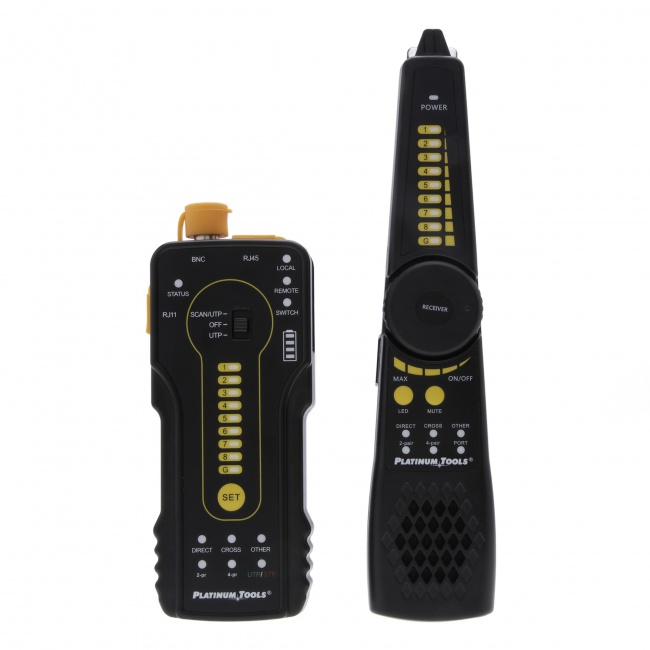
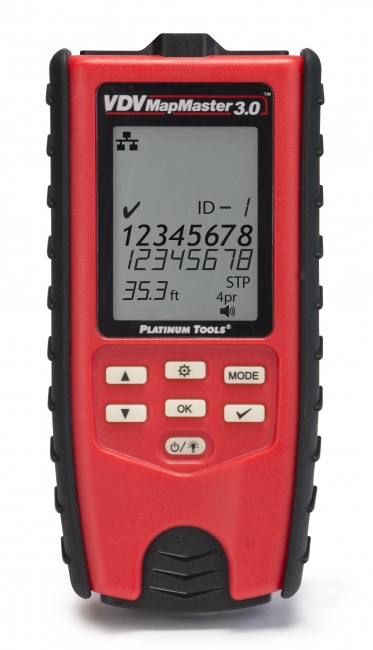
A label is only as good as the test that confirmed it. The MapMaster validates wire map and length per cable, and the tone probe is the failsafe for any cable that ends up labeled wrong.
Tool Bag and Field Organization
Carry the labeling supplies and the termination tools together so labels go on at termination time
A complete termination kit means the connector, the crimper, the tester, and (your addition) the label printer all live in the same bag. Labels go on at the moment the cable is terminated, not at the end of the day.
Related Articles
Frequently Asked Questions
What is the best way to label network cables on a large install?
Use a structured naming convention applied at both ends of every cable, plus the patch panel port and the wall plate. The convention should encode building, floor, room, and drop number, for example BLD1-F2-R204-D03. Print labels with a thermal-transfer cable label printer, never handwrite. Apply the label as a self-laminating wrap with a clear protective tail so the printed text is sealed under plastic and does not rub off.
Where should you place a cable label?
Place a label within 4 to 6 inches of each termination. That is close enough to read without unbundling cables but far enough back that the connector body and strain relief are not hidden. Both ends of the cable get a label, the patch panel port gets a matching label, and the wall plate gets a matching label. Long cable runs through ceilings or risers should get a midpoint label every 50 feet so a future tech can identify a cable in a tray without tracing the entire run.
Should you use color coding on cable labels?
Yes. Color coding is the fastest visual filter when you are looking at 200 cables in a rack. Use jacket color or a colored boot or strain relief to encode the cable's purpose at a glance: data, voice, security cameras, wireless access points, building automation. The printed label still carries the unique identifier, but color tells you what kind of circuit you are looking at before you read anything. Colored strain reliefs on standard gray cable are an easy way to encode color at the connector end.
What ANSI/TIA standard covers cable labeling?
ANSI/TIA-606-C is the labeling and administration standard for telecommunications infrastructure. It defines four classes of administration based on installation size, prescribes naming conventions for cables, panels, racks, and pathways, and requires that as-built records match the labels. For most commercial installs over 50 drops, Class 2 or Class 3 administration is the target. The standard also specifies that labels must be machine-printed, durable, and visible without disturbing the cable. See the TIA-568 standards guide for how 606 fits with the rest of the TIA family.
What do you do when a label falls off?
Labels fall off when they are paper, hand-written, attached with masking tape, or applied to a dirty cable jacket. The fix is using self-laminating thermal-transfer labels designed for cable, applied to a clean dry jacket. Wipe the cable with isopropyl alcohol before labeling. Wrap the printed area first, then wrap the clear laminating tail over it so the print is sealed. Done correctly, a label survives the full life of the cable.
Build a Labeled Install That Lasts
The connectors, strain reliefs, cable management, and testers that make a labeled install hold up over time. Our catalog includes the parts that pair with whatever label printer you carry.