The Quick Answer
Intermittent failures are harder to diagnose than constant failures because the cable looks healthy when you test it. A wire map runs clean, the link light is on, and the user complains that "it goes out for a second every few minutes." The cable is not lying — it is reporting its current state, which happens to be working. The fault appears only when the conditions that trigger it are present.
The fix is to run the diagnostic in a way that captures the drop when it happens, then narrow down the physical component that is failing.
Confirm the Drop Is the Cable
Before tearing into the cable plant, rule out everything else. A surprising fraction of "cable drops" turn out to be wireless interference, DHCP renewal failures, switch port flaps, or driver issues.
Check switch logs
Most managed switches log link up and link down events with timestamps. Pull the log for the affected port. If the switch is showing repeated link state changes, the cable is the most likely cause. If the switch shows the link as continuously up but the user reports drops, the issue is higher in the stack — DHCP, DNS, application timeouts, or a flaky NIC driver.
Test with a wired laptop
Plug a known-good laptop into the same wall jack and run a continuous ping to the gateway. If the laptop also drops, the cable plant is involved. If the laptop runs clean for an hour, the original device or its NIC is the problem.
Check for wireless interference
If the user is on a docking station that bridges wired and wireless, the drops may be on the wireless side. Disable the wireless adapter and re-test. Many "ethernet drops" turn out to be a Wi-Fi card briefly preferred over the wired connection.
Isolate the Failing Segment
A typical structured cable path has four points of failure: device patch cord, wall jack, permanent link in the wall, and switch patch cord. Swap them out one at a time.
Swap the device patch cord
This is the cable that gets stepped on, kicked, rolled over by chair wheels, and bent at sharp angles when the desk is moved. It is the statistically most likely failure point. Swap with a known-good patch cord and watch for drops over 30 minutes.
Swap the switch patch cord
The patch cord at the switch end is often shorter and routed through high-density cable management. Tight bends and constant adjustment when other patch cords are added or removed can stress this cable. Swap and re-test.
Test the permanent link
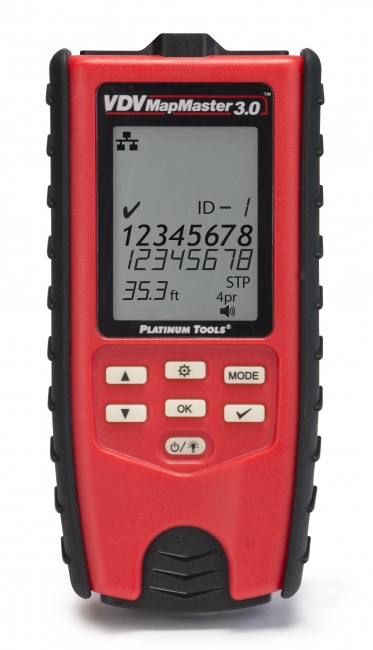
If both patch cords are good and drops continue, the permanent link inside the wall is suspect. Disconnect the patch cords at both ends. Use a VDV MapMaster 3.0 or LANSeeker to test the permanent link in isolation. If the run passes wire map but drops continue in service, the failure is marginal and you need to stress-test (see next section).
Test the switch port
Move the patch cord to a different switch port. If drops stop, the original port has a failing PHY. Switch ports do go bad — heat, capacitor failure, and ESD damage all kill ports over time.
Stress-Test the Connectors
A marginal connection passes a static test. It fails when something physically changes — temperature, vibration, or pressure on the cable. Reproduce that physical change and watch for the failure to appear.
Flex-test at each connector
Connect the suspect cable to a tester. While the test is running, gently bend and flex the cable within an inch of each connector. A marginal crimp will show up as a flickering open or intermittent short on the tester display when the cable is moved. The connector that produces the flicker is the one that needs to be re-terminated.
Tap-test the wall plate
Lightly tap the wall jack while the test runs. A loose punch-down at the keystone jack will momentarily break contact when the jack is disturbed. If tapping causes drops, pull the wall plate, re-seat or re-punch the affected pair, and re-test.
Vibration test the patch panel
At the rack, gently flex the patch panel termination block while watching the tester. Punch-down terminals can loosen over time, especially when patch cords are added and removed frequently. Re-punch any pair that responds to the vibration.
Heat-test if the run is in a warm space
If the cable runs through an attic, a south-facing wall cavity, or near HVAC equipment, the failure may correlate with temperature. Run a continuous monitor for several hours and correlate drop times against ambient temperature. If a clear pattern emerges, the marginal connection is in a thermally cycled location.
Inspect the Cable Path for Damage and EMI
If the connectors are clean and the cable still drops, look for damage along the run or for EMI sources that could induce noise.
Walk the cable path
Where you can see the cable, look for staples through the jacket, sharp bends around door frames or floor joists, crush points where furniture sits on the cable, and rodent damage in attic or basement runs. Any of these can damage internal conductors without breaking the jacket visibly.
Check for parallel power runs
Ethernet that runs parallel to power cables for more than a few feet can pick up enough EMI to corrupt packets. TIA specifies minimum separation: 5 inches from a parallel power run, 12 inches from fluorescent ballasts and motors. If the cable is forced to run near these sources and cannot be moved, switch to shielded cable and connectors to suppress the induced noise.
Look for HVAC and equipment cycles
Drops that happen at predictable intervals are often correlated with equipment cycles. A large motor on the same circuit that starts every 20 minutes can induce a brief noise spike that knocks out marginal links nearby. Map the drop times against equipment schedules.
Intermittent Drop Causes Reference
Match the symptom pattern you are seeing to the most likely cause and the diagnostic that confirms it.
| Symptom Pattern | Most Likely Cause | Diagnostic |
|---|---|---|
| Drops when cable is moved | Marginal crimp at one connector | Flex-test at each end with cable tester |
| Drops when door is opened or closed | Cable pinched at door jam | Inspect cable path along door route |
| Drops at predictable intervals | EMI from cycling equipment (HVAC, compressor) | Map drop times to equipment schedule |
| Drops in afternoon, fine in morning | Temperature-sensitive marginal contact | Continuous monitor with temperature log |
| Drops only at high traffic | Bad pair causing speed renegotiation | Run BERT test with speed certifier |
| Drops since cable was moved or rerouted | Cable damaged during the move | Wire map and length, look for new fault distance |
| Drops with PoE devices on the same switch | PoE alien crosstalk into adjacent runs | Re-route or use shielded cable; see PoE guide |
| Drops after thunderstorms | Surge damage to switch port or NIC | Test on different switch port; check surge protection |
Capturing the Drop in the Act
The fastest way to diagnose an intermittent is to be watching when it happens. These techniques let you record the drop event and tie it to a physical cause.
Continuous ping with timestamps
From the affected device, run a continuous ping to the gateway with timestamps. On Linux or macOS: ping -i 1 192.168.1.1 | while read line; do echo "$(date) $line"; done. When the user reports a drop, the timestamp tells you when it happened. Correlate against switch logs, equipment cycles, and physical events.
Switch port logging
Enable link state change logging on the switch port. Most managed switches will record every link up and link down event with a timestamp. A pattern of frequent up/down events confirms the failure is at the physical layer.
Continuous tester monitoring
Disconnect the cable from active equipment and connect it to a cable tester, then put it into continuous loop mode so it retests over and over while you watch. Flex each connector and run your hand along the cable; a momentary fault shows up as a flicker on the display the instant you disturb it. Nothing is recorded, so this is a test you watch rather than one you leave running. Catching bit errors rather than wire map flickers takes an extended BERT run on a speed certifier, which is not an instrument we sell.
Tone and probe to confirm cable identity
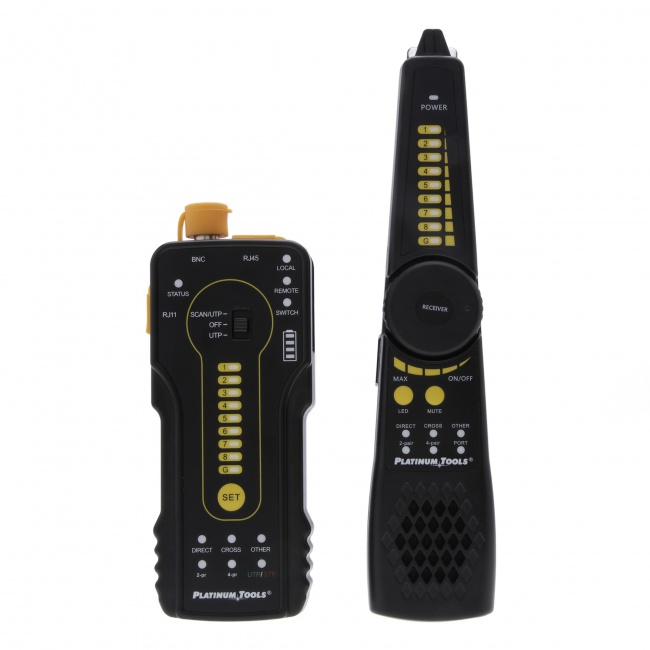
Before pulling a cable to replace it, use a digital tone probe at the patch panel and trace it to the wall jack. Mislabeled patch panels are common, and replacing the wrong cable wastes hours.
Tools for Catching Intermittent Drops
The right tools for intermittent troubleshooting are the ones that keep testing while you disturb the cable, so a fault that lasts half a second still shows up somewhere you can see it. Static testers that pass a cable in 30 seconds are not enough. What you will not find below is a bit error rate test, because that is a speed certifier job and we do not sell a speed certifier. An intermittent that passes wire map every time has to be caught another way: run the wire map in a continuous loop and flex each connector while you watch the screen, or read the error counters on the switch port.
Continuous Loop Test Mode
Retests the run in a loop while you flex the cable by hand.
Connect the suspect cable, start the test, and flex each connector. The MapMaster shows length and split pair detection in addition to wire map. For comparison of testers, see Best Network Cable Testers.
Tone Generator and Probe
Identifies and traces cables through walls and bundles when patch panel labels are wrong or missing.
Critical step before replacing a cable: confirm you are working on the right one. Tone the cable from the rack and trace it to its actual termination point. Mismatched labeling is one of the leading causes of wasted troubleshooting time.
If Re-Termination Is the Fix
When the diagnosis points to a marginal connector, the fix is to cut off the connector and put on a fresh one. The new termination needs to be done correctly to avoid creating a new marginal connection.
- Cut the cable cleanly at least an inch back from the existing connector to remove any conductors that may have been work-hardened or nicked.
- Strip the jacket cleanly with a cable jacket stripper set to the correct depth. Do not nick the conductors.
- Maintain pair twist as close to the contact blades as physically possible. Excessive untwist is the leading cause of crosstalk failures.
- Use pass-through connectors like the EZ-RJ45 Cat6 so you can verify all eight conductors before crimping.
- Use a quality crimp tool like the PTS PRO Universal Crimp Tool with a complete ratchet cycle.
- Test every termination before declaring it done. Wire map at minimum. For business-critical runs, run a BERT test with a speed certifier.
For a deeper walk-through of termination quality, see Cat6A Crimp Failures and Troubleshooting Network Cable Problems.
Frequently Asked Questions
What causes intermittent network drops on a wired connection?
Intermittent drops are almost always caused by a marginal physical connection: a partial crimp where one conductor barely touches the contact blade, a connector with a broken latch that slowly works loose, a cable kinked or crushed at one point, a loose patch panel punch-down, or EMI from nearby equipment. Wireless interference and DHCP issues can also masquerade as cable drops, so isolate the cable first by testing with a known-good replacement.
How do I find which cable is causing intermittent drops?
Swap cables one at a time and watch for the drop to follow the cable. Start with the patch cord at the device, then the patch cord at the switch, then the permanent link if drops continue. Use a cable tester with continuous monitoring or a switch port that logs link state changes to catch the drop when it happens.
Why does my ethernet drop when I move the cable?
If moving the cable causes a drop, the failure is at one of the connectors. A conductor inside the connector is barely touching the contact blade, and physical movement breaks the connection momentarily. Cut off the connector closest to where you moved the cable and re-terminate. If both ends produce drops when flexed, re-terminate both.
Can a cable pass a wire map test and still drop intermittently?
Yes. A wire map test is a snapshot. A marginal connection that holds for the duration of the test will show pass even though it fails under load or temperature change. Use a tester with continuous monitoring, run a load test with a speed certifier, or flex-test the connectors while the wire map runs to catch marginal terminations.
Does temperature affect cable drops?
Yes. Marginal contacts can change behavior with temperature because metals expand and contract slightly. A cable that works fine in a cool morning may start dropping when an attic or south-facing wall warms up in the afternoon. If drops correlate with time of day or HVAC cycles, suspect a marginal termination on a cable run that experiences temperature swings.
Stop Chasing Ghosts
The right diagnostic tools turn intermittent troubleshooting from a multi-day investigation into a one-visit fix. Browse continuous-monitor testers and termination kits.