The Quick Answer
Keystone jacks are how horizontal cable runs end. Whether you are wiring a single home office or a 64-port commercial closet, every cable that terminates in a faceplate or a patch panel is doing essentially the same job: bringing the four pairs from the cable into a standardized 8-position contact array. The technique is the same. Only the volume changes.
This guide walks through the complete process from cutting the cable to verifying the jack with a tester. It applies to Cat5e, Cat6, and Cat6A keystone jacks, with notes on where Cat6A differs.
Tools and Materials You Need
Before you start, lay out everything within arm's reach. Stopping mid-termination to look for a punch down tool is how mistakes happen.
The minimum kit
- Keystone jacks rated for the cable category you are installing (Cat5e, Cat6, or Cat6A)
- Wall plate or patch panel with the right number of keystone openings
- 110 punch down tool with a cut blade
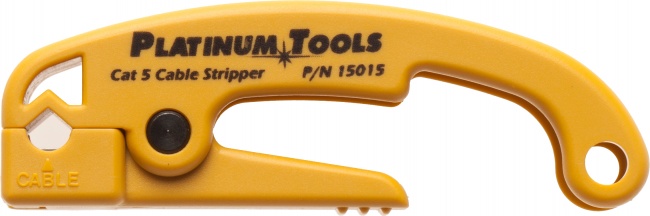
- Cable jacket stripper with adjustable depth
- Diagonal cutters or flush cutters for trimming
- Cable tester for wire map verification
- Permanent marker for labeling cable ends
Nice to have
- A roll of Velcro for dressing the cable behind the wall plate
- A flashlight or headlamp for working inside boxes
- Pair of small needle-nose pliers for stubborn wires
For a complete punch down setup, the Pro Punchdown Kit bundles a quality 110 tool with the cutting blade and supporting tools. If you are also pulling the cable, a Multi Strip cable stripper handles the jacket cleanly without nicking conductors.
Step 1: Strip the Jacket
Measure 1.5 to 2 inches from the end of the cable and strip the jacket. Use a stripper with adjustable depth so the blade scores the jacket without slicing into the conductors. After scoring, flex the cable and the jacket should split cleanly. Slide it off and discard.
If you are working with Cat6A, strip closer to 2 inches because the internal separator needs to be trimmed back and you want the conductors long enough to reach across the jack body without strain. For Cat5e, 1.5 inches is plenty.
Common mistakes at this step
- Nicking conductors. A nicked conductor is a future failure point. If you see copper exposed under the insulation, cut the cable back and start again.
- Stripping too much. Excess exposed pair length increases crosstalk because the wires lose their twist. Cat6A is especially sensitive to this. Strip what you need, no more.
- Stripping too little. If the jacket is too far back, the strain relief inside the jack cannot grip it. The whole termination depends on a single inch of pair to hold the cable in place, which fails under any tension.
Step 2: Untwist and Spread the Pairs
You will see four twisted pairs and, on Cat6 and Cat6A, a plastic separator running down the center. Cut the separator flush with the jacket using diagonal cutters. Then untwist each pair just enough to lay the conductors flat.
The 568 specification calls for a maximum untwist of 0.5 inches at the termination point. Less is better. Each twist a pair has cancels out external interference; each turn you remove makes that pair slightly more susceptible to noise.
Identifying the pairs
Standard four-pair UTP cable contains:
- Pair 1: Blue and white-blue
- Pair 2: Orange and white-orange
- Pair 3: Green and white-green
- Pair 4: Brown and white-brown
The "white-color" wire has a white background with a stripe of the pair's main color. Some cheap cable uses solid white tracers that can be hard to distinguish from one another in low light. Bring a flashlight.
Step 3: Match the Color Code on the Jack
Every keystone jack has color stickers or printed labels on the IDC contact slots. Look at the jack body. You will see two columns of colors, one labeled T568A and one labeled T568B. Pick a standard for your job and stay consistent.
T568A vs T568B
The two standards swap the orange and green pairs. Functionally they are identical. T568B is the more common choice in commercial installations in North America, while T568A is sometimes used in residential and federal government work. The cable does not care which one you pick. The only rule is that both ends of every run must match.
For a deeper look at the difference, see our T568A vs T568B guide.
T568B Order (Pin 1 to 8)
- 1: White/Orange
- 2: Orange
- 3: White/Green
- 4: Blue
- 5: White/Blue
- 6: Green
- 7: White/Brown
- 8: Brown
T568A Order (Pin 1 to 8)
- 1: White/Green
- 2: Green
- 3: White/Orange
- 4: Blue
- 5: White/Blue
- 6: Orange
- 7: White/Brown
- 8: Brown
Step 4: Seat the Wires Into the IDC Slots
Press each conductor down into its color-matched IDC slot until the wire bottoms out. Do not strip the insulation off the conductor. The IDC contact slices through the insulation as the wire is forced down, biting into the copper to make the connection. This is what "insulation displacement contact" means.
Seat each wire firmly with your fingers first. Get all eight conductors in their slots and roughly seated before reaching for the punch down tool. Keep the pair twists as close to the jack body as possible. If a pair has more than half an inch of untwist before it enters the IDC slot, pull the wire back, twist it tighter, and reseat it.
Step 5: Punch Down With a 110 Tool
Now use the 110 punch down tool. Most tools have two ends or a reversible blade: one side is "punch and cut" (with a blade) and the other is "punch only" (no blade). For installing a new jack, use the cut side. The blade trims the excess wire flush with the IDC contact in the same motion that seats the wire.
Tool orientation matters
The cut blade should face away from the jack body, toward the excess wire you want to remove. If you punch with the blade facing the jack, you will cut the wire on the wrong side and ruin the termination. The blade is usually marked "CUT" with an arrow indicating the cut direction.
Hold the tool perpendicular to the jack and press straight down with steady force. The tool will seat the wire and cut the excess in a single click. If your tool is not impact-style, you may need to apply more pressure. Quality impact tools store energy in a spring and release it in a controlled snap, which gives a cleaner cut and a more consistent termination.
Step 6: Secure the Strain Relief
Most keystone jacks have a strain relief mechanism on the back: either a snap-down cap, a screw clamp, or a zip tie tab. Activate whatever method your jack uses to lock the cable jacket in place. The strain relief is what keeps tension on the cable from pulling on the IDC contacts. Skip this step and the jack will eventually fail when the cable is bumped or moved.
If the strain relief feels loose around the cable, the jacket is too short. Pull the wires out of the IDC slots, cut the cable back, and start over with a longer strip. This is annoying but necessary. A keystone jack with no real strain relief will pass an initial wire map test and fail six months later.
Step 7: Snap the Jack Into the Wall Plate or Patch Panel
Keystone jacks are designed to snap into standardized rectangular openings. The jack has a flexible tab on one side and a fixed lip on the other. Insert the lip first, then press the jack body until the tab clicks into place on the opposite side.
Watch the orientation. Most jacks have an "up" indicator (often an arrow or the cable type printed right-side up). For wall plates with multiple ports, decide on an orientation convention for the whole job and stick to it. Mixing port orientations on the same plate looks unprofessional and confuses anyone troubleshooting later.
Step 8: Test the Jack
Plug a known-good patch cable into the jack and run a wire map test with a cable tester. The tester verifies that pins 1 through 8 are connected end to end in the correct order, with no shorts, opens, or split pairs.
For basic verification, a VDV MapMaster 3.0 handles wire map and length measurement. Adding a throughput test takes a speed qualification tester, and confirming a Cat6A jack against 10 Gigabit limits including NEXT and return loss requires a certifier. We sell neither, so plan those two steps as a rental or a subcontract.
Common wire map errors
| Error | What it Means | Fix |
|---|---|---|
| Open | One pin has no connection | Wire not fully seated; re-punch that conductor |
| Short | Two pins are connected when they should not be | Two wires are touching; cut back and redo |
| Reversed Pair | A pair's two wires are swapped | Swap the two conductors in that pair |
| Crossed Pair | Two pairs are connected to the wrong pins | Wrong color code followed; redo the punch down |
| Split Pair | Wires are paired on the wrong twists | Often passes wire map but fails NEXT; redo |
A split pair is the most insidious error because basic continuity testers do not catch it. The cable will work at low speeds but degrade or fail at gigabit and above.
Cat6A Considerations
Cat6A keystone jacks are physically larger than Cat5e or Cat6 jacks because they include internal compensation circuitry to handle the higher frequencies. The body of a Cat6A jack often does not fit in older "low-profile" wall plates designed for Cat5e. Confirm wall plate compatibility before you commit to a brand.
Cat6A also requires more careful pair management. Untwist length matters more, the separator must be trimmed cleanly, and the strain relief must hold the larger jacket diameter without crushing it. For a deeper look at Cat6A termination, see our Cat6A crimp failures guide.
Recommended Products for Keystone Jack Installation
The right tools make every jack faster and more reliable. These are the products that handle keystone work cleanly across Cat5e, Cat6, and Cat6A.
Punch Down Tools
110 punch down tools for IDC keystone jack terminations
A complete kit with the impact punch down tool and the supporting tools you need for keystone work.
Cable Strippers
Strippers that score the jacket without nicking conductors
The Multi Strip handles a wide range of cable diameters. The Cat5/6 Jacket Stripper is a dedicated tool for standard twisted pair.
Cable Testers
Verify each jack passes wire map before you close the plate
The MapMaster catches the wiring faults a new jack is most likely to have: a reversed pair, a conductor that did not seat, or a split pair.
Related Articles
Frequently Asked Questions
What is the correct strip length for a keystone jack?
Strip back about 1.5 to 2 inches of jacket for most keystone jacks. The exact length depends on the jack design, but you want enough conductor exposed to seat each pair into its color-coded slot without bending the wires sharply, while keeping the jacket close to the back of the jack so it can be secured by the strain relief.
Should I wire keystone jacks to T568A or T568B?
Either standard works as long as both ends of the cable use the same one. T568B is more common in commercial installations in the United States. Most modern keystone jacks have color codes printed for both standards on the same jack body. Pick one and stay consistent across the entire job.
Do I need a punch down tool for keystone jacks?
Yes, for traditional 110-style keystone jacks. The punch down tool seats each conductor into the IDC slot and trims the excess in one motion. Some jacks are tool-less and use a snap-cap design instead, but for a clean, reliable termination on standard keystone jacks, a 110 punch down tool is required. The Pro Punchdown Kit includes everything you need.
Can I reuse a keystone jack after punching it down?
Yes, but with caveats. You can re-punch a wire into the same IDC slot once or twice, but each insertion wears the contact. If you need to redo a termination repeatedly, replace the jack rather than reusing it. Keystone jacks are inexpensive, and a degraded contact will fail certification on Cat6A.
How do I test a keystone jack after installation?
Plug a patch cable from the jack into a cable tester and run a wire map test. The VDV MapMaster 3.0 verifies pin order, opens, shorts, and split pairs. A speed qualification tester adds a throughput test on top of that, and confirming a Cat6A jack against NEXT and return loss limits requires a certifier. CrimpShop sells wire map testers but neither of those two instruments, so plan them as a rental or a subcontract.
Build Your Keystone Termination Kit
Stock the punch down tools, strippers, and testers you need to terminate every jack on every job. Browse the gear that handles Cat5e through Cat6A.